Adding Providers
Zirzir ships with Chapa and Telebirr built in. To add another provider — M-Pesa, Flutterwave, Stripe, or anything else — you build a plugin. Plugins are standalone Go binaries that Zirzir discovers and manages automatically.
How Plugins Work
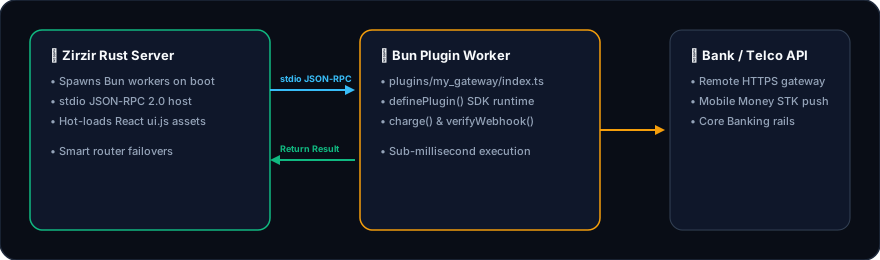
Section titled “How Plugins Work”Zirzir uses HashiCorp’s go-plugin system. Your plugin runs as a separate process that communicates with the Zirzir server over gRPC. This means:
- Plugins can’t crash the main server
- You can develop and deploy plugins independently
- Any Go developer can add a provider without touching the Zirzir codebase
Quick Start
Section titled “Quick Start”1. Create a Go Module
Section titled “1. Create a Go Module”mkdir zirzir-plugin-myprovider && cd zirzir-plugin-myprovidergo mod init github.com/yourorg/zirzir-plugin-myprovidergo get github.com/zirzir/zirzir/plugin2. Implement the Provider Interface
Section titled “2. Implement the Provider Interface”Create main.go:
package main
import ( "context" "encoding/json" "fmt"
"github.com/zirzir/zirzir/plugin")
type MyProvider struct { apiKey string}
func main() { plugin.Serve(&MyProvider{})}That’s the skeleton. Now implement the 7 methods of the plugin.Provider interface.
The Provider Interface
Section titled “The Provider Interface”type Provider interface { Info() ProviderInfo Configure(config json.RawMessage) error InitiatePayment(ctx context.Context, req *PaymentRequest) (*PaymentResponse, error) CheckStatus(ctx context.Context, txnID string) (*StatusResponse, error) ParseWebhook(payload []byte, headers map[string]string) (*WebhookEvent, error) UISchema() *UISchema CustomRoutes() []CustomRoute}Let’s walk through each method.
Info() — Provider Metadata
Section titled “Info() — Provider Metadata”Returns static information about your provider. This is displayed in the dashboard and used for validation.
func (p *MyProvider) Info() plugin.ProviderInfo { return plugin.ProviderInfo{ Code: "myprovider", // Unique identifier (lowercase, no spaces) Name: "My Provider", // Display name Version: "1.0.0", Description: "Accept payments via MyProvider", Countries: []string{"ET"}, // ISO 3166-1 alpha-2 Currencies: []string{"ETB"}, // ISO 4217 PaymentTypes: []string{"web_checkout", "mobile_money"}, ConfigFields: []plugin.Field{ { Name: "api_key", Label: "API Key", Type: "password", // text, password, select, checkbox Required: true, }, { Name: "environment", Label: "Environment", Type: "select", Required: true, Options: []plugin.Option{ {Value: "sandbox", Label: "Sandbox"}, {Value: "production", Label: "Production"}, }, }, }, }}The ConfigFields define what credentials merchants need to provide. These are rendered as a form in the dashboard.
Configure() — Accept Credentials
Section titled “Configure() — Accept Credentials”Called once per merchant when the provider is first used. Parse the JSON credentials and store them on your struct.
func (p *MyProvider) Configure(config json.RawMessage) error { var cfg struct { APIKey string `json:"api_key"` Environment string `json:"environment"` }
if err := json.Unmarshal(config, &cfg); err != nil { return fmt.Errorf("parse config: %w", err) }
if cfg.APIKey == "" { return fmt.Errorf("api_key is required") }
p.apiKey = cfg.APIKey return nil}InitiatePayment() — Start a Payment
Section titled “InitiatePayment() — Start a Payment”Called when the SDK’s charge() method hits the server. Make the API call to your provider and return a normalized response.
func (p *MyProvider) InitiatePayment( ctx context.Context, req *plugin.PaymentRequest,) (*plugin.PaymentResponse, error) { // 1. Call your provider's API resp, err := p.callProviderAPI(req) if err != nil { return nil, fmt.Errorf("provider API error: %w", err) }
// 2. Return a normalized response return &plugin.PaymentResponse{ ProviderTxnID: resp.TransactionID, Status: plugin.StatusPending, PaymentURL: resp.CheckoutURL, // Empty for USSD providers Message: "Payment initiated", }, nil}PaymentRequest fields available to you:
| Field | Type | Description |
|---|---|---|
Reference | string | Merchant’s unique reference |
Amount | float64 | Payment amount |
Currency | string | ISO 4217 code |
CustomerPhone | string | Customer phone |
CustomerEmail | string | Customer email |
CustomerName | string | Customer name |
ReturnURL | string | Redirect after payment |
CallbackURL | string | Webhook URL |
Metadata | map[string]string | Arbitrary metadata |
CheckStatus() — Query Transaction Status
Section titled “CheckStatus() — Query Transaction Status”Called when the SDK’s verify() method hits the server or when the dashboard refreshes a transaction.
func (p *MyProvider) CheckStatus( ctx context.Context, txnID string,) (*plugin.StatusResponse, error) { resp, err := p.queryProviderStatus(txnID) if err != nil { return nil, err }
return &plugin.StatusResponse{ ProviderTxnID: txnID, Status: mapStatus(resp.Status), // Map to: pending, completed, failed, cancelled Message: resp.Message, PaidAt: resp.CompletedAt, // ISO 8601 timestamp }, nil}ParseWebhook() — Handle Incoming Webhooks
Section titled “ParseWebhook() — Handle Incoming Webhooks”Called when a provider sends a webhook to POST /api/v1/webhooks/:provider. Parse the provider’s payload format and return a normalized event.
func (p *MyProvider) ParseWebhook( payload []byte, headers map[string]string,) (*plugin.WebhookEvent, error) { // 1. Verify signature (if the provider signs webhooks) sig := headers["x-signature"] if !p.verifySignature(payload, sig) { return nil, fmt.Errorf("invalid webhook signature") }
// 2. Parse the provider-specific payload var data ProviderWebhookPayload if err := json.Unmarshal(payload, &data); err != nil { return nil, fmt.Errorf("parse webhook: %w", err) }
// 3. Map to Zirzir's event format status := plugin.StatusPending eventType := "payment.pending"
switch data.Status { case "SUCCESS": status = plugin.StatusCompleted eventType = "payment.completed" case "FAILED": status = plugin.StatusFailed eventType = "payment.failed" }
return &plugin.WebhookEvent{ Type: eventType, ProviderTxnID: data.TransactionID, Reference: data.MerchantRef, Status: status, Amount: data.Amount, Currency: data.Currency, Message: data.StatusMessage, RawPayload: payload, }, nil}UISchema() — Dashboard Widgets
Section titled “UISchema() — Dashboard Widgets”Optional. Return UI components for the Zirzir dashboard.
func (p *MyProvider) UISchema() *plugin.UISchema { return &plugin.UISchema{ DashboardWidgets: []plugin.Widget{ { Type: "stat", Title: "MyProvider Transactions", Config: json.RawMessage(`{ "endpoint": "/api/v1/payments?provider=myprovider", "countField": "total" }`), }, }, }}Return nil if you don’t need custom widgets.
CustomRoutes() — Extra API Endpoints
Section titled “CustomRoutes() — Extra API Endpoints”Optional. Add provider-specific endpoints under /api/v1/providers/:code/....
func (p *MyProvider) CustomRoutes() []plugin.CustomRoute { return []plugin.CustomRoute{ { Method: "GET", Path: "/balance", Handler: func(c echo.Context) error { balance, _ := p.getBalance() return c.JSON(200, balance) }, }, }}Return nil if you don’t need custom routes.
Build and Deploy
Section titled “Build and Deploy”Build the plugin
Section titled “Build the plugin”go build -o myprovider .Deploy
Section titled “Deploy”Copy the binary to the Zirzir server’s plugins directory:
cp myprovider /path/to/zirzir/plugins/Restart the server. Zirzir discovers and loads the plugin automatically:
INFO starting server port=8080INFO loaded plugin provider=myprovider version=1.0.0Docker deployment
Section titled “Docker deployment”Mount your plugins directory:
services: zirzir: image: ghcr.io/recite-labs/zirzir/server:latest volumes: - ./plugins:/app/plugins:roFull Example: M-Pesa Plugin
Section titled “Full Example: M-Pesa Plugin”See the complete M-Pesa example in the repository:
server/plugin/examples/mpesa/main.goBuild it with:
cd servermake plugin-exampleTesting Your Plugin
Section titled “Testing Your Plugin”Run your plugin binary directly to check that it starts without errors:
./myprovider# Should block waiting for gRPC connection — that means it's working# Ctrl+C to stopThen start the Zirzir server and:
- Check
GET /api/v1/providers— your provider should appear - Configure credentials via the dashboard or admin API
- Create a test payment with
POST /api/v1/payments
Status Constants
Section titled “Status Constants”Use these constants when setting status values:
| Constant | Value | Meaning |
|---|---|---|
plugin.StatusPending | "pending" | Awaiting customer action |
plugin.StatusCompleted | "completed" | Payment confirmed |
plugin.StatusFailed | "failed" | Payment failed |
plugin.StatusCancelled | "cancelled" | Customer cancelled |
Next Steps
Section titled “Next Steps”- Self-Hosting — deploy the server
- Server API Reference — full endpoint reference
- Provider Guides — see how built-in providers work